Revisão semanal de entregabilidade: o que checar em cada domínio de cliente
Segunda-feira de manhã, e onze domínios carregam o seu nome: o seu próprio e mais dez de clientes que acham que email é problema resolvido. Nada está pegando fogo. Esse é o problema. Nada avisa que um prestador de serviço editou uma zona DNS na quinta, ou que o IP compartilhado por trás da newsletter de um cliente entrou numa blocklist durante o fim de semana.
A revisão semanal é como a maioria das agências lida com isso. Funciona até um ponto, e onde esse ponto fica importa tanto quanto as verificações.
Os quatro sinais que realmente mudam sozinhos
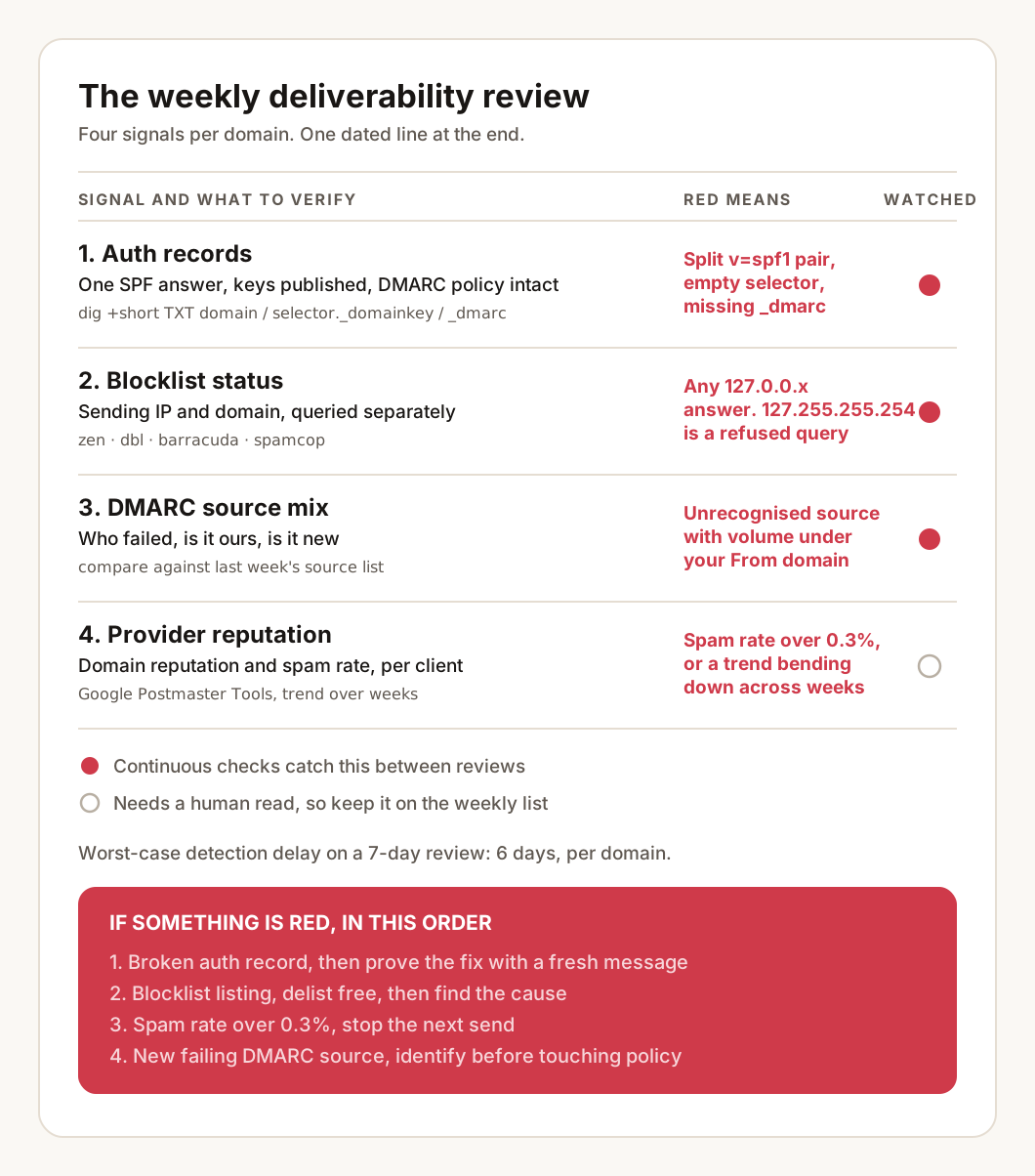
A entregabilidade cobre uma superfície ampla e uma lista curta de coisas que mudam de uma semana para a outra sem ninguém decidir:
- Registros de autenticação. Pessoas editam DNS. Um fornecedor é adicionado e o registro SPF acaba dividido em dois. A plataforma de envio rotaciona uma chave e o novo seletor nunca é publicado.
- Status em blocklists. Muitas vezes não tem nada a ver com o remetente. Um IP compartilhado herda o erro de um vizinho, ou um endereço antigo numa lista acaba sendo um spam trap.
- O mix de fontes no DMARC. Uma fonte de envio nova aparecendo nos relatórios é ou uma ferramenta que ninguém mencionou ou alguém fazendo spoofing do domínio.
- Reputação do lado dos provedores. Defasada e lenta para se mover, mas é a única visão que o Gmail oferece de como ele trata o domínio de verdade.
Todo o resto ou não se move no relógio semanal (higiene de lista, templates, prática de envio) ou se move tão devagar que uma checagem semanal é o instrumento errado. Delimite a revisão a esses quatro por domínio e a nada mais.
Sinal 1: os registros de autenticação, contra uma base conhecida
Como fica um conjunto saudável de registros quando consultado direto:
dig +short TXT example.com
"v=spf1 include:_spf.google.com include:sendgrid.net ~all"

dig +short TXT s1._domainkey.example.com
"v=DKIM1; k=rsa; p=MIIBIjANBgkqhkiG9w0BAQEFAAOCAQ8AMIIBCgKCAQEA..."

dig +short TXT _dmarc.example.com
"v=DMARC1; p=quarantine; rua=mailto:dmarc@example.com; fo=1"
Três formatos de falha cobrem quase tudo que aparece na prática. Duas respostas TXT separadas que começam com v=spf1, o que é inválido sob a RFC 7208 e derruba a verificação inteira em vez de juntar as duas. Uma resposta vazia num seletor DKIM, o que significa que a chave foi rotacionada ou a publicação nunca terminou. E um registro _dmarc ausente num domínio que tinha um no mês passado, geralmente porque a zona foi reconstruída num provedor de DNS novo.
Vale checar além da existência: o número de lookups do SPF. Um fornecedor pode adicionar um include: dentro do próprio registro dele e empurrar um domínio para cima do limite de dez lookups sem ninguém tocar no DNS dele. O SPF flattener mostra a árvore inteira quando um registro está perto do limite, e o email health check devolve um veredito por domínio em vez de três respostas cruas.
O porém que nenhuma disciplina resolve: a consulta diz o que o registro contém agora, e a revisão só significa algo contra uma base salva. Manter essa base atualizada para onze domínios, à mão, é a parte que silenciosamente deixa de acontecer no terceiro mês. O LitInboxes re-executa essas verificações a cada seis horas por domínio e guarda cada resultado, então a comparação já está pronta e uma mudança carrega a data em que aconteceu. De um jeito ou de outro, garanta que a revisão tenha um antes, não só um depois.
Sinal 2: os quatro blocklists que pedem ação
O status em blocklists é uma resposta DNS. Para zonas baseadas em IP, os octetos do IP de envio são invertidos e a zona é anexada no final:
dig +short 24.100.51.198.zen.spamhaus.org
127.0.0.4
Qualquer resposta 127.0.0.x é uma listagem, e o último octeto identifica qual base de dados pegou o IP. Sem resposta significa limpo. A resposta que engana as pessoas é 127.255.255.254, que não é uma listagem: é o Spamhaus recusando uma consulta que veio por um resolvedor público grande como 8.8.8.8 ou 1.1.1.1. O DNSBL usage FAQ deles documenta os códigos.
Zonas baseadas em domínio recebem o hostname em vez de um IP invertido:
dig +short example.com.dbl.spamhaus.orgQuatro listas correspondem de forma confiável a dano real na caixa de entrada: Spamhaus ZEN e DBL, Barracuda e SpamCop. Verifique o IP de envio e o domínio separadamente, porque eles são listados por motivos diferentes e geralmente só um deles é problema seu para resolver. O blocklist checker roda o conjunto mais amplo num único domínio quando você precisa de uma resposta rápida.
O custo manual aqui é aritmética. Duas consultas por lista, vezes quatro listas, vezes onze domínios, dá oitenta e oito consultas numa segunda-feira, e cada uma descreve só este momento. Uma listagem que chega na terça e aparece seis dias depois teve uma semana inteira de envio para causar dano. O LitInboxes consulta oito zonas de alto sinal num cronograma e alerta na transição, não no estado. Se a revisão continuar manual, registre a data de cada rodada limpa, para que uma listagem futura fique pelo menos delimitada a uma semana.
Sinal 3: o delta de fontes de email no DMARC, não os relatórios
Ninguém lê relatórios agregados de DMARC por inteiro. Um relatório RUA cru é XML com um bloco de registro por fonte, e a parte que carrega informação se parece com isto:
<record>
  <row>
    <source_ip>198.51.100.24</source_ip>
    <count>412</count>
    <policy_evaluated>
      <disposition>none</disposition>
      <dkim>fail</dkim>
      <spf>pass</spf>
    </policy_evaluated>
  </row>
  <identifiers><header_from>example.com</header_from></identifiers>
</record>
Três perguntas por fonte, e só três: quem falhou, se é seu, e se é novo. Um forwarder conhecido falhando no SPF toda semana é ruído, porque o encaminhamento quebra o SPF por design e o alinhamento DMARC via DKIM é o que sobrevive a ele. Uma fonte que ninguém reconhece, enviando 400 mensagens sob o domínio From de um cliente, é a razão para abrir os relatórios.
Duas dessas três perguntas são respondidas por comparação, não por leitura. “É novo” precisa da lista de fontes da semana anterior para o mesmo domínio, então a revisão depende de um registro que alguém manteve. O LitInboxes ingere os relatórios e destaca as fontes que mudaram, o que é um trabalho de anotação que vale entregar a algo que não esquece. De um jeito ou de outro, persiga o que é novo ou está acima de cerca de um por cento do volume e deixe o resto quieto.
Sinal 4: reputação, e o número que tem um limite
O Google Postmaster Tools é gratuito e é o único lugar onde o Gmail diz alguma coisa. Dois números importam: a reputação do domínio, e a taxa de spam contra o teto de 0.3% das diretrizes para remetentes do Google, especificada para remetentes de grande volume desde fevereiro de 2024. Abaixo de poucas mil mensagens por dia os gráficos ficam cheios de falhas, então um único dia ruim em volume baixo é chuva passageira, não clima.
A versão manual é um login no navegador por cliente, por semana, sem nada vigiando o intervalo e sem alerta quando a linha cruza o limite. A reputação se move devagar nas duas direções, então o sinal é a tendência entre semanas e não o valor de segunda-feira, e uma tendência precisa de histórico que uma olhada semanal não cria. Anote por escrito o estado de reputação de cada domínio, porque o valor desse número mora no valor anterior dele.
Ordem de triagem quando um sinal fica vermelho
Dois sinais ficam vermelhos ao mesmo tempo com frequência suficiente para a ordem importar. Trabalhe de cima para baixo e pare na primeira causa encontrada:
- Um registro de autenticação quebrado. Conserte o DNS, depois prove com uma mensagem nova, porque um registro corrigido não faz nada pelo email já enviado. Leia a linha
Authentication-Resultsda mensagem nova no header analyzer antes de dar o problema por resolvido. - Uma listagem em blocklist no IP de envio ou no domínio. Saia da lista pelo processo gratuito da própria lista, depois encontre a causa, nessa ordem. Nunca pague por delisting expresso.
- Taxa de spam acima de 0.3%. Pare o próximo envio. Olhe para a última campanha e para o segmento que a recebeu, não para o template.
- Uma fonte nova falhando no DMARC. Identifique a fonte antes de tocar na política. Apertar para
p=rejectenquanto um fornecedor legítimo está desalinhado quebra email real. - Reputação em queda com todo o resto limpo. Isso é engajamento, que é problema de lista e não de DNS. A ordem completa de diagnóstico está aqui.
O que a revisão semanal deixa de fora de propósito
A revisão continua curta por causa do que não está dentro dela. Templates que não mudaram não precisam de re-scoring. A cauda longa de blocklists menores não vale uma ação, porque uma listagem ali raramente muda a entrega real na caixa de entrada e vários desses operadores querem pagamento para te remover. A taxa de abertura deixou de ser um sinal de entregabilidade confiável, por motivos cobertos no artigo sobre a regra de pixel da CNIL. Testes de posicionamento com caixas sementes têm lugar depois de uma mudança, ou uma vez por mês, não toda semana.
Adicionar algo à revisão significa tirar algo dela.
Onde o modelo semanal quebra
Uma revisão a cada sete dias significa que o atraso de detecção no pior caso é de seis dias. Uma chave DKIM que para de ser publicada numa terça envia email sem assinatura até a segunda seguinte, e em onze domínios essa exposição se multiplica. Rodar as verificações com mais cuidado não muda nada, porque o limite é o intervalo, não o método.
Três respostas, em ordem crescente de quão bem se sustentam:
- Aperte o intervalo. Duas vezes por semana corta a exposição pela metade e dobra o trabalho. Escala mal depois de três ou quatro domínios.
- Reduza o escopo. Revise registros de autenticação e blocklists semanalmente, reputação mensalmente. Mais barato, e aceita um ponto cego de propósito.
- Pare de revisar no relógio. Faça as verificações rodarem continuamente e leia apenas o que mudou. É isso que o LitInboxes faz: ele re-executa as verificações DNS de cada domínio a cada seis horas, guarda o histórico com datas que transforma “algo quebrou em julho” em “o registro SPF perdeu o include do SendGrid em 16 de julho”, observa os blocklists e os sinais de reputação, e envia a mudança por email, Slack, Discord ou webhook. A segunda-feira vira ler um changelog em vez de rodar oitenta e oito consultas.
As ferramentas gratuitas com link acima respondem à pergunta de hoje para um domínio. O monitoramento contínuo responde à pergunta da próxima terça para todos eles, o que é um trabalho diferente. Há um passo a passo aqui se você quiser ver sem cadastrar nada.
A revisão, na ordem
Por domínio:
- Confirme exatamente uma resposta
v=spf1, igual ao registro esperado, e dentro do limite de dez lookups. - Confirme uma chave DKIM não vazia para cada seletor em uso.
- Confirme que a política DMARC e o endereço
ruasão o que foi definido. - Verifique ZEN, DBL, Barracuda e SpamCop, para o IP de envio e para o domínio separadamente.
- Compare as fontes de envio DMARC desta semana com as da semana passada, e investigue só o que é novo ou grande.
- Leia a reputação do domínio e a taxa de spam no Postmaster Tools contra a linha de 0.3%.
- Anote uma linha com data por domínio, mesmo quando nada aconteceu, especialmente quando nada aconteceu.
- Se algo estiver vermelho, siga a ordem de triagem acima e pare na primeira causa.
Os passos 1 a 6 são a revisão. O passo 7 é o que torna a revisão da próxima semana possível, e é o passo pulado primeiro. Qualquer coisa que rode essas verificações entre as segundas-feiras escreve o passo 7 por você, o que é a maior parte do argumento contra fazer isso à mão quando o número de domínios chega a dois dígitos.
Os mesmos oito passos estão disponíveis num imprimível de uma página, com um checkbox por item e a ordem de triagem nele, no tamanho certo para colar ao lado do monitor e ir marcando cliente por cliente. O formulário abaixo faz o envio.
Receba o checklist semanal de revisão para imprimir
Quer uma cópia para guardar? Informe seu e-mail e enviaremos uma versão em PDF imprimível deste checklist para você concluir offline.