Gmail and Yahoo Sender Requirements in 2026: What Actually Gets Enforced
The Gmail and Yahoo bulk sender requirements took effect on February 1, 2024, and for most of that first year missing them meant worse placement, not blocked mail. That grace is over. Since November 2025, Gmail has been rejecting non-compliant traffic at the SMTP level, which means the requirements now show up in your bounce log instead of your open rate.
This is a status check for 2026: what the rules are, what enforcement actually looks like on the wire, and what to verify on your own domains today.
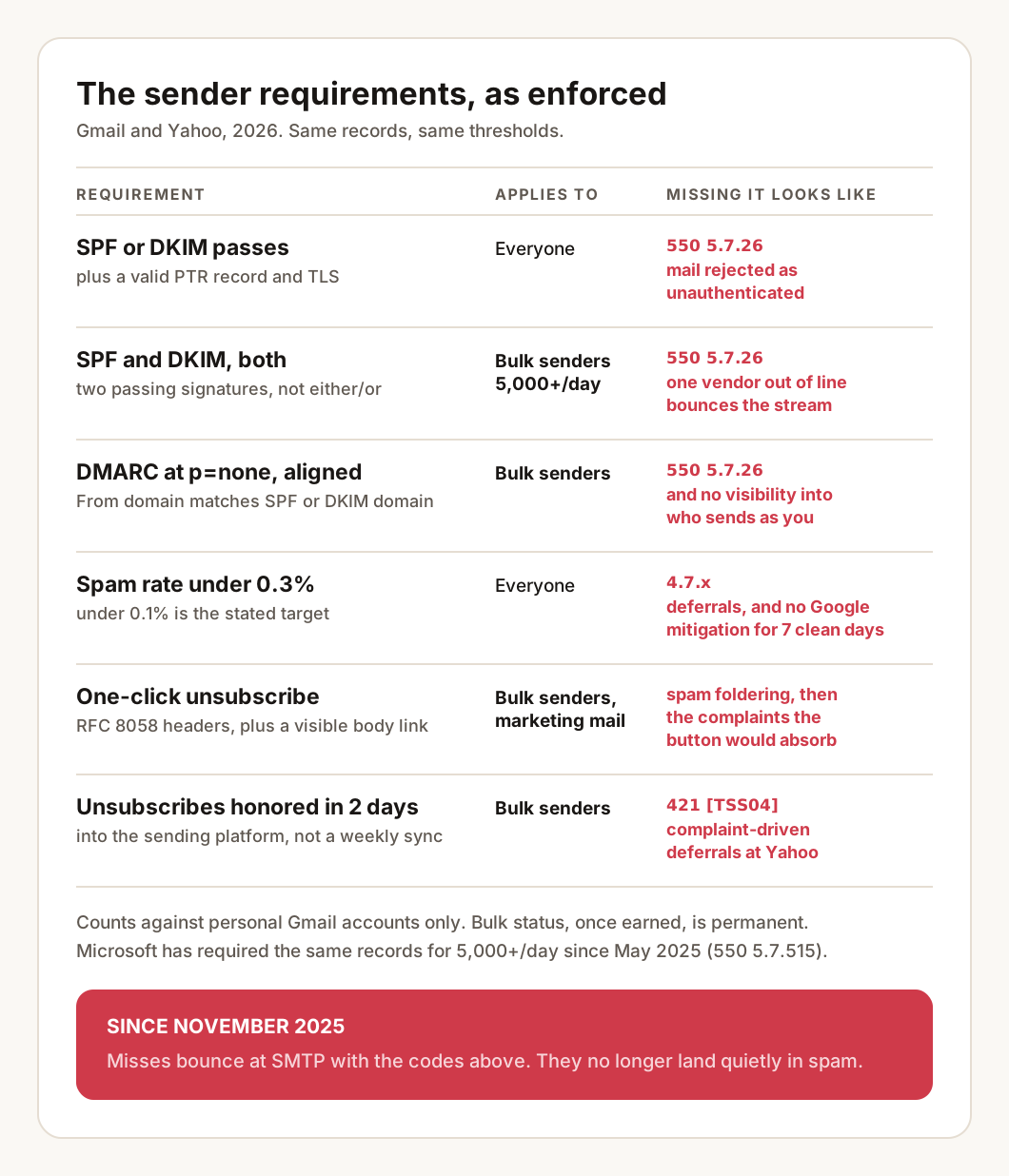
The requirements, in one table
Google’s Email sender guidelines and the Yahoo Sender Hub have converged on nearly identical rules. Two tiers:
| Requirement | Who it applies to |
|---|---|
| SPF or DKIM authentication | Everyone |
| Valid PTR record (forward and reverse DNS match) | Everyone |
| TLS on the sending connection | Everyone |
| Spam rate below 0.3%, ideally below 0.1% | Everyone |
| SPF and DKIM, both passing | Bulk senders |
DMARC record, at least p=none, with an aligned From domain |
Bulk senders |
| One-click unsubscribe (RFC 8058) plus a visible link in the body | Bulk senders, marketing mail |
| Unsubscribes honored within 2 days | Bulk senders |
A bulk sender is anyone sending close to 5,000 messages or more to personal Gmail accounts in a 24-hour period. Two details from Google’s sender guidelines FAQ that most summaries skip: bulk sender status has no expiration date, one qualifying day marks the domain permanently, and the rules apply only to mail sent to personal Gmail accounts, not to Google Workspace recipients. Yahoo additionally specifies a minimum 1024-bit DKIM key.
The minimum DMARC record that satisfies both providers is one line:
_dmarc.example.com. TXT "v=DMARC1; p=none; rua=mailto:dmarc@example.com"The DMARC generator builds this record with a reporting address, and the alignment requirement, your From domain matching the domain SPF or DKIM validated, is the part to test rather than assume.
What enforcement looks like in 2026
Through 2024 and most of 2025, a sender missing the requirements mostly saw quiet degradation: spam foldering and slow reputation damage. Google’s FAQ now says it plainly: since November 2025, non-compliant messages “will experience disruptions, including temporary and permanent rejections.”
On the wire, the permanent rejection for unauthenticated mail is 550 5.7.26:
550-5.7.26 This mail has been blocked because the sender is unauthenticated.
550-5.7.26 Gmail requires all senders to authenticate with either SPF or DKIM.
550-5.7.26 Authentication results:
550-5.7.26 DKIM = did not pass
550-5.7.26 SPF [example.com] with ip: [203.0.113.25] = did not pass
550 5.7.26 For instructions on setting up authentication, go to
550 5.7.26 https://support.google.com/mail/answer/81126#authentication
Read it bottom-up: the message names the domain and IP it evaluated, and which of the two checks failed. Both failing usually means a missing record; one failing usually means a vendor sending on your behalf without alignment. Gmail’s FAQ also documents a family of temporary 4.7.x codes that rate-limit suspect traffic rather than refuse it, 4.7.28 for example is a volume quota on an IP, domain, or DKIM key that is misbehaving. A 4xx deferral retries; treat a rising rate of them as the warning before the 5xx.
Yahoo’s enforcement leans on deferral. The string senders see, documented in Yahoo’s SMTP error codes, is the TSS04 deferral:
421 4.7.0 [TSS04] Messages from 203.0.113.25 temporarily deferred due to
unexpected volume or user complaints - 4.16.55.1;
see https://postmaster.yahooinc.com/error-codes
The two named causes are the diagnosis: either volume jumped in a way Yahoo does not recognize for that IP, or recipients are hitting the spam button. Retrying harder makes both worse.
The action: search your bounce logs for 5.7.26, 4.7. and TSS04 for the last 30 days. If your platform hides raw bounces, its suppression list is the fallback, and any entry dated after November 2025 with an authentication phrasing deserves a look.
The 0.3% spam rate line in practice
The number is measured in Google Postmaster Tools, and it is stricter than it reads. Google’s stated expectation is to stay below 0.1% and never reach 0.3%. The consequence of crossing it changed in June 2024: a domain at or above 0.3% becomes ineligible for mitigation, meaning Google support will not intervene on a delivery problem until the rate stays below 0.3% for 7 consecutive days. The threshold is not just a filter input; it is the eligibility line for getting help at all.
Yahoo publishes the same 0.3% ceiling with a detail worth knowing: their rate is calculated on mail delivered to the inbox. Mail that already lands in spam cannot generate complaints, so a sender can watch the measured rate improve while placement collapses, the denominator is shrinking, not the problem.
One campaign to a stale segment can spend the whole budget: 0.3% is three complaints per thousand delivered. The action is a floor, not a ceiling: open Postmaster Tools, check the spam rate graph for the last 90 days, and if there is any spike, match its date against your send log before the next campaign goes out.
One-click unsubscribe: where implementations still fail
The requirement, mandatory for bulk marketing mail since June 1, 2024, is RFC 8058, and it is a pair of headers, not a link:
List-Unsubscribe: <https://example.com/u?t=8f3ac91>
List-Unsubscribe-Post: List-Unsubscribe=One-Click
The gotchas that still fail senders in 2026:
- A footer link is not the mechanism. The headers are what Gmail renders as its own unsubscribe button at the top of the message. Google’s FAQ is explicit that mailto-only and plain URL links do not satisfy the requirement. The visible body link is required in addition, not instead.
- The endpoint must accept a POST with no human steps. A “manage preferences” page that requires a login or a confirmation click fails the one-click definition.
- The clock is 2 days. Both providers require the unsubscribe to be honored within two days. A weekly sync from your ESP to your CRM misses it.
- Transactional mail is exempt, and mislabeling marketing as transactional to skip the button is the kind of thing complaint rates expose on their own.
The action: send your own latest campaign to a mailbox you control and read the raw headers, both List-Unsubscribe lines should be present, and the header analyzer will show them alongside the authentication results in one pass.
Microsoft now runs the same play
The third large mailbox provider joined in 2025. Since May 5, 2025, Microsoft requires SPF, DKIM, and an aligned DMARC record from domains sending over 5,000 messages a day to Outlook.com, Hotmail, and Live addresses, and rejects non-compliant mail with its own permanent code, walked in the 550 5.7.515 Outlook guide:
550 5.7.515 Access denied, sending domain example.com does not
meet the required authentication level.
The practical consequence: there is no longer a major consumer inbox where unauthenticated bulk mail is merely filtered. The same three records satisfy all three providers, so a domain that passes for Gmail passes for Outlook, provided alignment holds. If Outlook placement is your specific problem, the diagnostic order differs from Gmail’s and is covered in the spam placement guide.
What to verify on your domains today
Verifying compliance once takes about ten minutes with a domain health check: it reads SPF, DKIM, and DMARC together and reports whether alignment actually holds, which is the failure mode the bounce strings above keep pointing at.
The catch is that compliance is not a state you reach, it is a state that drifts. The requirements bind records that other people edit: a vendor onboarded in marketing adds an include, a DNS migration drops a _dmarc record, a platform rotates a DKIM selector. Every one of those changes is silent, and since November 2025 the failure mode for silence is rejected mail rather than a slow slide. A one-off check answers today’s question for one domain; it has no memory of what the records looked like before the change, which is exactly the information a rejection spike makes urgent. LitInboxes re-runs these checks on every monitored domain every six hours, keeps the dated history that turns “bounces started last week” into “the DKIM selector disappeared on a Tuesday”, watches the spam-rate and reputation signals, and sends changes through email, Slack, Discord or a webhook. There is a walkthrough here if you want to see it on a real domain.
The checklist
- Confirm SPF and DKIM both pass for every platform that sends as your domain, not just the main one.
- Confirm a DMARC record exists at
p=noneminimum, withruareporting on, and that your From domain aligns with SPF or DKIM. - Search the last 30 days of bounces for
5.7.26,4.7.andTSS04. - Read the spam rate in Postmaster Tools against the 0.1% target and the 0.3% ceiling, for the last 90 days.
- Send yourself a campaign and confirm both
List-Unsubscribeheaders are present and the endpoint accepts a bare POST. - Confirm unsubscribes reach your sending platform within 2 days, not on a weekly sync.
- Confirm the sending IP has a PTR record that resolves back to the same hostname.
- Re-check after any DNS change, vendor addition, or platform migration, because that is when compliant domains quietly stop being compliant.
Frequently asked questions
Do the Gmail and Yahoo sender requirements apply if I send fewer than 5,000 emails a day?
Partly. The baseline rules apply to everyone: SPF or DKIM authentication, a valid PTR record, TLS, and a spam rate under 0.3%. The stricter set, both SPF and DKIM, DMARC with an aligned From domain, and one-click unsubscribe, formally applies at roughly 5,000 messages per day to personal Gmail accounts. In practice, authenticating fully is the safe default at any volume.
Does Gmail reject non-compliant email now, or just send it to spam?
Since November 2025 Gmail has been rejecting non-compliant traffic at the SMTP level, using temporary 4.7.x codes and permanent 5.7.x codes such as 550 5.7.26 for unauthenticated mail. Before that, most failures were spam-foldered. A rejection is visible in your bounce log; spam placement is not.
Do messages to Google Workspace addresses count toward the requirements?
No. Google states the sender guidelines and enforcement apply only to mail sent to personal Gmail accounts. Mail to Workspace-hosted domains is not covered, but you usually cannot tell which of your recipients are which, so the practical answer is to comply everywhere.
Is the unsubscribe link in my email footer enough?
No. Bulk senders need RFC 8058 one-click unsubscribe, which is a pair of message headers (List-Unsubscribe and List-Unsubscribe-Post) that the mailbox provider turns into its own unsubscribe button. Gmail and Yahoo require the header mechanism for marketing mail, and a visible link in the body on top of it. The footer link alone satisfies neither.