Why Does My Email Fail DMARC When SPF Passes?
You found an email in the spam folder and opened its source to see what went wrong. One line says spf=pass. The line right under it says dmarc=fail. Same message. Two opposite answers.
Both answers are true, and your records are probably fine. SPF and DMARC ask different questions. SPF asks: was this computer allowed to send this mail? DMARC asks: does the sender that passed the test carry your domain, the one in the From line people see? With most sending tools, it does not. That mismatch is the whole problem, and it has a name: alignment. The most common cause is a sending platform that mails from its own domain. The fastest check is two lines in the message headers, and this article walks them.
DMARC pass requirements vs SPF pass requirements
Every email has two sender addresses. The From line is the one people see. The other hides inside the message, and mail servers use it to pass the message along. That hidden address is the envelope. Think of a real letter: the name at the top of the page is the From line, the address on the outside is the envelope.
SPF works like a guest list. Your DNS record lists the computers allowed to send mail for a domain. The receiver checks the sending computer against the list that belongs to the envelope domain. On the list means spf=pass. SPF never looks at the From line.
DMARC works like an ID check. It asks: does the domain that passed SPF, or the domain that signed the message with DKIM, match the domain in the From line? That match is called alignment. One match, from either path, is enough to pass.
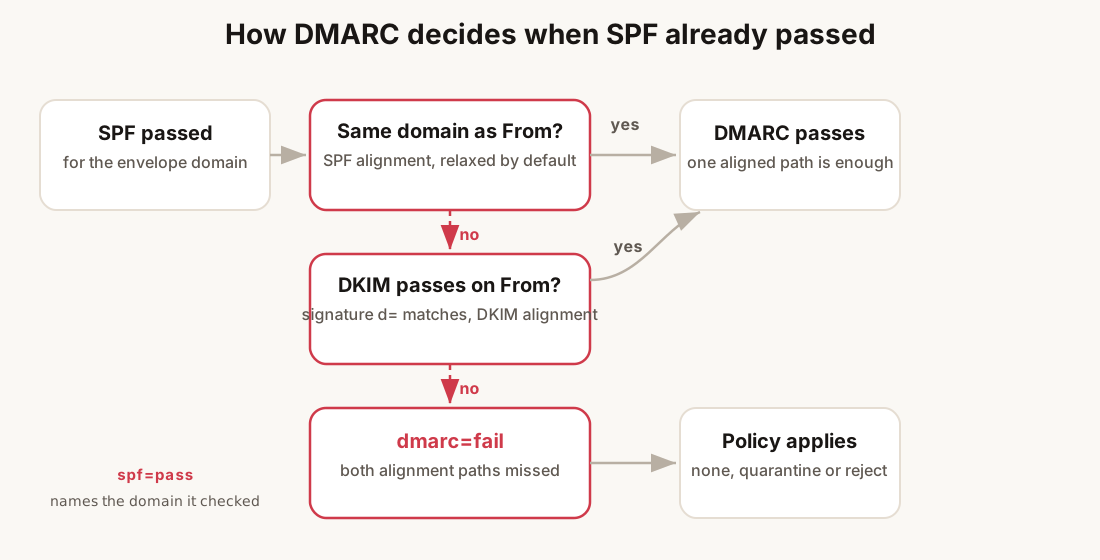
Here are the headers of a message that fails both paths, cut down to the lines that matter:
From: Ana <ana@example.com>
Return-Path: <bounces+7c2f-jane=example.net@mailpilot.example>
DKIM-Signature: v=1; a=rsa-sha256; d=mailpilot.example; s=s1; ...
Authentication-Results: mx.google.com;
       spf=pass (google.com: domain of bounces+7c2f@mailpilot.example
         designates 198.51.100.7 as permitted sender)
       dkim=pass header.i=@mailpilot.example
       dmarc=fail (p=NONE dis=NONE) header.from=example.com
Read it the way the receiver did. SPF passed, for mailpilot.example. DKIM passed, for mailpilot.example too. The From line says example.com. Neither passing check names that domain. So the message is not proven to come from the domain it claims.
If SPF itself is failing, with softfail, permerror or a lookup limit, that is a different repair, covered in the SPF failure post.
Do this: before touching any DNS, open one failing message and find the domain inside its spf=pass line. If that domain is not yours, this is an alignment problem, not a record problem.
The three causes, ranked
Cause one: your platform mails from its own bounce domain
The most common answer by far. Every ESP, invoicing tool, helpdesk and course platform sends through its own equipment at first. With those defaults, the envelope and the DKIM signature both carry the tool’s domain, not yours. SPF checks the tool’s domain and passes. DMARC checks your From domain and fails.
Gmail sometimes shows this same problem right in the inbox: a small grey line under your name that reads via mailpilot.example. Same root cause, two symptoms. The email “via” post covers the display side.
The tell: the domain after domain of in the spf=pass line belongs to your platform, and you never published DNS records for it.
What to do: turn on the platform’s custom sending domain, shown in the fix section below.
Cause two: DKIM cannot rescue the message
When SPF does not align, DKIM is the only path left that can pass DMARC. Three things break that path. The signature is missing entirely, so dkim=none. The signature exists but fails, dkim=fail, usually because a DNS record was dropped or the platform changed its signing key. Or the signature passes, but for the platform’s domain, like the d=mailpilot.example line above. Passing for someone else’s domain does not help you.
This cause often arrives slowly. The records were fine for a year. Then a DNS move dropped one record, the last working path went dark, and DMARC started failing. No error anywhere.
The tell: dkim=none, dkim=fail, or a passing dkim=pass whose header.i= domain is not your From domain.
What to do: republish or finish the DKIM records for your domain at the platform. The DKIM setup guide has the steps.
Cause three: a forwarder or mailing list re-sent it
Sometimes your setup is fine and the last hop broke it. A forwarder or a mailing list takes your message and sends it again under its own envelope. SPF then checks the forwarder’s domain, and may pass for it. Mailing lists also add a footer to the body and change the subject line, which breaks the DKIM signature, because the signature covers the exact words of the message. The forwarded copy fails DMARC. The copy in your own Sent folder passed.
The tell: failures show up at one recipient, one company, or one list, while everyone else gets your mail fine. The spf=pass domain names the forwarder, often the recipient’s own employer.
What to do: check that your own headers align, and keep your DKIM signature alive, since that is the path forwarding breaks. The forwarder’s own hop is theirs to fix.
SPF alignment vs DKIM alignment: which one failed?
The Authentication-Results block names all three domains you need. Compare smtp.mailfrom with header.from first. When the mailfrom domain matches your From domain, SPF aligned, and a dmarc=fail sitting next to that points at the DKIM side, or at strict mode, below.
One setting changes what counts as a match. By default, both paths use relaxed alignment: the two domains just need the same main part. em892.example.com matches example.com. A record can demand exact matches instead:
v=DMARC1; p=quarantine; aspf=s; adkim=s; rua=mailto:dmarc@example.comWith aspf=s, mail from billing.example.com with From: ana@example.com passes SPF and still fails alignment. Strict mode is rare, and most people who have it inherited it. If your reports show failures for mail that looks fine, check the record before you blame the mail.
Do this: read smtp.mailfrom and header.from first. They settle SPF alignment in one glance. Then read header.i=, or the d= in the signature, for the DKIM side.
What p=quarantine does when DMARC fails
The failure and what happens next are two separate things. The p= tag in your DMARC record tells receivers what to do with mail that fails. none means collect reports, change nothing. quarantine means put it in the spam folder. reject means refuse it at the door. A record can also start gently with pct=, quarantining only 10% of failures at first.
The header shows which rule the receiver applied. dmarc=fail (p=NONE ...) means your record says none, so that message was scored and reported, not junked by DMARC itself. Moving from none toward stronger rules is its own journey, and the DMARC none post walks it.
Do this: look up what your record actually says before assuming the worst. A fail under p=none is a report entry, not a junking.
How to check DMARC alignment for SPF and DKIM
Paste the raw source of one failing message into the free header analyzer. It puts the envelope, signing and From domains side by side, so the comparison takes seconds. Two more checks finish the job. The DMARC generator shows what your record says today, including the alignment mode. The email health check reads your live DNS records the way a receiver does, and it catches a missing record the platform dashboard still calls verified.
Do this: run the analyzer on one message first, then the health check on the domain. The message tells you which path failed. The domain tells you why.
DMARC failures in Google Workspace and Office 365
Each suite has its own version of this problem.
In Google Workspace, mail sent from the suite itself aligns out of the box: the envelope carries your domain. Failures come from the edges: a From address on a domain never added and verified in the admin console, a workflow tool relaying through Gmail with its own envelope, an alias domain with records on the main domain but none of its own.
In Office 365, DKIM for a custom domain is off until someone turns it on, which surprises nearly everyone. Until then your mail carries no signature, dkim=none, or is signed by the default onmicrosoft.com domain. SPF through Microsoft can still carry the message. But the moment mail routes through a third-party connector, the missing second path turns into dmarc=fail.
Do this: in the 365 admin center, open DKIM for your custom domain and enable it, publishing the two CNAME records it asks for. In Workspace, make sure every domain that appears in a From address anywhere in your stack is added, verified and authenticated.
What a DMARC failure costs your deliverability
Under p=none, a failure does not filter mail by itself, but it still costs you. Gmail and Yahoo have required bulk senders to publish DMARC since February 2024, and mail that fails it is exactly the mail their filters distrust, so it can sink toward spam before your policy says a word. The full rules are in the sender requirements post. Unaligned mail also looks like spoofing, and spoofing is where the whole spam-placement story begins.
Do this: treat every failing verdict as free information from the receivers you mail. Fix the alignment, then let the reports confirm it.
The fix
The repair is the same at every platform, under different names. Mailchimp calls it authenticated domain. SendGrid calls it sending domain authentication. Amazon SES calls it a custom MAIL FROM domain. Turn the feature on for the domain in your From address, publish every record it hands you, the return path subdomain and the DKIM records together, and wait out the DNS spread. Half a setup works fine until the aligned half breaks, so publish the whole set. The DMARC setup guide has the steps, and the “via” post shows the record shapes.
A fixed message’s headers read like this:
Authentication-Results: mx.google.com;
       spf=pass (google.com: domain of bounces+7c2f@em892.example.com
         designates 198.51.100.7 as permitted sender)
       dkim=pass header.i=@example.com
       dmarc=pass (p=NONE dis=NONE) header.from=example.com
The envelope moved onto em892.example.com. The signature moved onto example.com. Both paths align. DMARC passes.
Do this: after the DNS spread, send a fresh test to a real address and read its headers in the analyzer before you call it fixed.
What the one-off check cannot see
Alignment is a state, not a one-time fix, and states drift. A platform changes its signing keys and the old records stop working. A DNS move drops the envelope record quietly. A new tool joins your stack and starts sending with its own defaults, failing DMARC from day one. Each one flips today’s pass back to dmarc=fail, with no error anywhere. The first sign is usually mail landing in spam, weeks later.
That is the gap between checking and watching. LitInboxes re-checks your SPF, DKIM and DMARC records every six hours. It keeps dated history, so “alignment broke last month” becomes “the DKIM record broke on the 14th”. It sends an alert the moment a record moves. Email alerts are on every plan. Slack, Discord and webhook alerts are on Pro. One dashboard covers every client domain for agencies and consultants. There is a live demo if you want to see it first.
The checklist
- Open one failing message and find its Authentication-Results.
- Find the domain inside
spf=pass. Not your domain? That is the failure. - Read
dkim=and thed=in the signature. When SPF does not align, this path must pass and align. - Compare
smtp.mailfromwithheader.fromto see which alignment missed. - Check the
p=tag in your DMARC record to know whether failures are only reported or actually filtered. - Turn on the platform’s custom sending domain and publish the full record set.
- After the DNS spread, check a fresh message with the header analyzer and the email health check.
- Put the records on a watch cycle, weekly by hand or with continuous monitoring. Key changes and DNS moves break alignment silently.
Fix DMARC failing while SPF passes
- Read the Authentication-Results of one failing messageOpen the junked message, choose Show original or View message source, and find the Authentication-Results block. Look for the domain inside spf=pass, after "domain of". That is the domain SPF really checked. It is usually the platform's, not yours.
- Compare it with the domain in the From lineIf the spf=pass domain belongs to your sending platform, and your From address uses your own domain, SPF alignment is the failure. The SPF record itself is working fine.
- Check the DKIM line for the second pathRead dkim= in the same block, and the d= domain inside the DKIM-Signature header. DMARC passes when either path passes and aligns. So a passing signature on your own domain saves the message even when SPF does not align.
- Repair the broken path at the platformTurn on the feature the platform calls custom sending domain or authenticated domain. Publish every record it hands you: the return path subdomain for SPF alignment, and the DKIM records for signature alignment. Publishing steps live in the DMARC setup guide.
- Send a fresh test and check itWait for DNS changes to spread, about an hour. Send a new message to a real address. Confirm with a header analyzer that dmarc now reads pass, and that the envelope and signing domains are your own.
Frequently asked questions
Why is my DMARC failing if SPF passes?
Because DMARC does not read the SPF verdict. It reads the domain SPF checked, and asks whether that domain matches the domain in your From line. When your platform sends through its own bounce domain, SPF passes for the platform and DMARC fails for you. This is called an alignment failure, and it is the most common DMARC failure there is.
What is the difference between SPF alignment and DKIM alignment?
SPF alignment compares the envelope domain, the one in Return-Path, with the From domain. DKIM alignment compares the domain in the signature d= field with the From domain. Either match, with its own check passing, satisfies DMARC. Relaxed alignment accepts a subdomain match. Strict alignment, set with aspf=s or adkim=s, requires an exact match.
What does p=quarantine do when DMARC fails?
It tells receivers to put failing messages in the spam or junk folder instead of rejecting them. p=none asks for reports only. p=reject asks receivers to refuse the mail. Receivers treat the published policy as strong advice, not an order, so results vary a little by provider.
Can forwarding cause a DMARC failure even when my records are correct?
Yes. A forwarder or mailing list sends the message again under its own envelope, so SPF no longer runs for your domain. List footers also change the body, which breaks the DKIM signature. Your own sent copy aligns while the forwarded copy fails. That break sits on the forwarding side, which is the problem receivers built ARC to work around.