Why Does My Email Fail SPF? Reading the Record Receivers Check
A header says spf=fail on a message you definitely sent. Your email platform says SPF is set up. Both can be true at once, because SPF does not check the sender you see in the inbox, and because a record that reads fine can still be invalid the moment a receiver evaluates it.
SPF is the first identity check most receivers run, and it is the one most likely to be wrong in a way that looks fine until a specific message fails.
Almost every failure is one of three shapes: two SPF records on one domain, which is invalid and returns permerror; a vendor added without a DNS update, which fails only on that vendor’s mail; or the ten DNS lookup limit, which fails everything at once. Those are worked through in which SPF mistakes show up most often. Reading the record first is what tells you which one you have.
What does SPF actually check?
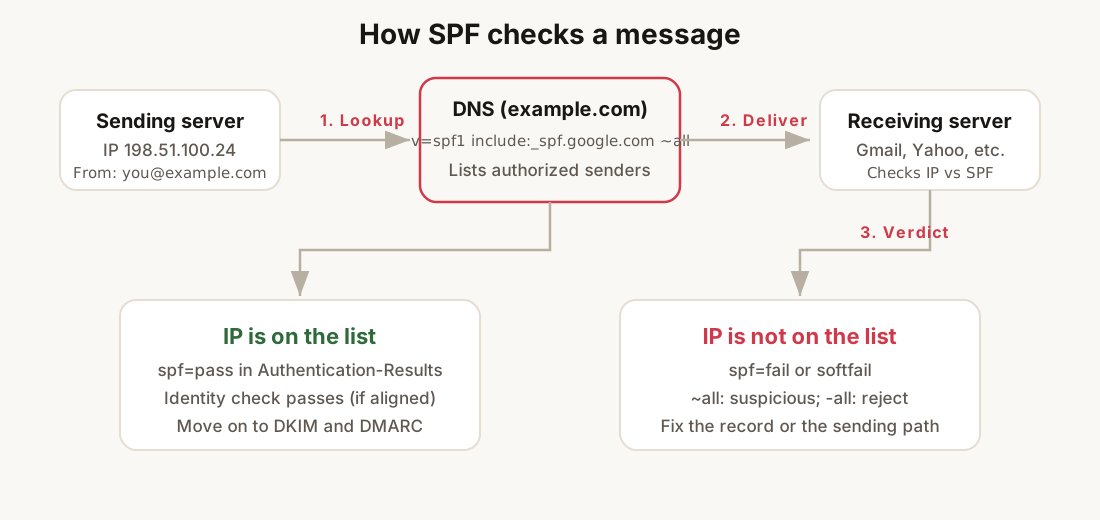
SPF answers one question: did this message come from a server your domain says is allowed to send?
It does not prove the message was not tampered with. That is DKIM. It does not tell receivers what to do when checks fail. That is DMARC. SPF is a permission list published in DNS, and receiving servers look up that list when mail arrives.
The lookup uses two pieces of information:
- The domain in the envelope sender (the
MAIL FROMaddress, often hidden in the Return-Path header). - The IP address of the server that connected to deliver the message.
If the IP is authorized by the SPF record for that domain, the receiver records spf=pass. If not, you get fail, softfail, or permerror, depending on how the record is written and whether the record itself is valid.
What SPF does not do: it does not check the visible From address your reader sees. A message can show you@yourbrand.com in the inbox while the envelope sender is bounce@esp-vendor.net. SPF only evaluates the envelope domain against the connecting IP. That gap is why DMARC alignment exists, and why SPF alone never stops display-name spoofing.
If mail is landing in spam and you have not read headers yet, start with the calm diagnostic and work identity checks in order. SPF is step one on that path.
What does a real SPF record look like?
A valid SPF record is a single TXT answer on the root domain (or the subdomain you send from). It always starts with v=spf1 and ends with a qualifier on all:
v=spf1 include:_spf.google.com include:sendgrid.net ~allRead it left to right:
| Token | Meaning |
|---|---|
v=spf1 |
Version marker. Required. If this is missing, the record is ignored. |
include:_spf.google.com |
Follow Google’s published SPF and treat its authorized IPs as authorized for you. This costs one DNS lookup. |
include:sendgrid.net |
Same for SendGrid. Another lookup. |
~all |
Soft fail: anything not listed is suspicious but not an automatic rejection at every receiver. |
The include: mechanism is how most SaaS senders get authorized without listing dozens of IP ranges by hand. Your record points at theirs; their record lists the IPs.
Other mechanisms you will see in the wild:
ip4:198.51.100.0/24authorizes a specific IPv4 range directly (no extra lookup).aormxauthorizes the domain’s A or MX hosts.redirect=otherdomain.comdelegates the entire policy to another domain’s SPF (uncommon; use with care).
A record with only v=spf1 ~all is technically valid and useless: it authorizes nobody explicitly, so everything soft-fails. A record with +all is worse: it authorizes the entire internet and signals misconfiguration to filters that pay attention.
If you are assembling a record from scratch, the SPF generator builds a single valid TXT from the senders you actually use. Run the finished record through the email health check before you call it done.
What is the difference between softfail and hardfail?
The qualifier on all is the policy for everyone not explicitly listed:
~all(softfail): “Probably not authorized.” Many receivers treat this as a negative signal but still accept the message if DKIM passes and reputation is clean.-all(hardfail): “Not authorized.” Stronger signal. Some receivers reject outright; others still accept with enough DKIM and DMARC cover.?all(neutral): “No statement.” Rare in practice; do not use it on a domain you send from.+all(pass all): Never use this on a production domain.
Most small senders publish ~all while they are still discovering every tool that sends on their behalf. Move to -all only when the include list is complete and you have DMARC reporting showing no unexpected sources for several weeks.
The practical difference shows up in headers. A softfail often reads spf=softfail even when the message is accepted. A hardfail on a domain with weak DKIM is a common path to bulk folder placement. Neither replaces DMARC policy; they are inputs to the receiver’s scoring, not commands.
Which SPF mistakes show up most often?
Three shapes cover the majority of real-world SPF failures.
Two SPF records on one domain. DNS returns two separate TXT answers that both start with v=spf1. RFC 7208 says that is invalid: receivers must not merge them, and many return permerror, which fails the check entirely. The fix is one record that combines every authorized sender. Delete the duplicate; do not stack.
A vendor added, DNS never updated. Marketing automation, ticketing, CRM, and billing tools all send mail. Each needs an include: or an IP range. The symptom is selective failure: mail from Google Workspace passes, mail from the new tool soft-fails because its IPs were never authorized.
The ten-lookup limit. Each include: and most other mechanisms cost a DNS lookup while the receiver evaluates the record. Past ten lookups, the result is permerror. Nested includes inside vendor records count against your limit even when you never touched DNS. If you are close to the line, the SPF flattener shows the full tree and the running count.
Less common but worth knowing: SPF on the wrong hostname (publishing on mail.example.com while the envelope uses example.com), and stale ip4: entries after a provider changes address ranges without notice.
How do you check and fix yours in five minutes?
Work from the envelope domain, not the visible From address.
- Send a test message from each platform you use (workspace mail, ESP, transactional provider).
- Open the raw source and find
Return-Pathorsmtp.mailfrom=inAuthentication-Results. That domain is what SPF evaluates. - Query it:
dig +short TXT example.comand confirm you get exactly one answer starting withv=spf1. - Read
Received-SPFor the SPF line insideAuthentication-Resultson the test message.passmeans that path is authorized.fail,softfail, orpermerrormeans fix the record or the sending configuration before you touch copy or templates. - If the record is missing a sender, add the vendor’s documented
include:and remove any duplicate SPF TXT you find on the same name.
For a single-domain snapshot without reading headers, the email health check returns SPF, DKIM, and DMARC verdicts in one pass.
What to do next
SPF is one leg of a three-legged stool. Publish DKIM signatures from every sending platform, then DMARC so receivers know what to do when SPF and DKIM do not align with your visible From domain. Creators and course businesses often run three or four tools on one domain; agencies run that problem at scale across client zones.
Once today’s record is clean, put it on a repeat. Auth records drift when DNS changes and nobody updates the TXT. A weekly pass catches that before deliverability does; the full workflow is in the weekly deliverability review.
Checklist
- Confirm one SPF TXT on the domain your envelope sender uses.
- List every system that sends mail for you and match each to an
include:orip4:in that record. - Set
~alluntil DMARC reports show no surprise sources, then consider-all. - Test each sending path and read
Authentication-Resultson a real message. - Fix
permerrorbefore you chase reputation or content causes.
Frequently asked questions
What does SPF actually check?
SPF checks whether the server that connected to deliver a message is authorized to send for the domain in the envelope sender, the MAIL FROM address usually visible in the Return-Path header. It does not check the From address your reader sees, and it does not verify that the message was untampered with.
What is the difference between softfail and hardfail in SPF?
The qualifier on the all mechanism sets the policy for senders you did not list. ~all is a softfail, meaning probably not authorized, which many receivers accept anyway when DKIM passes. -all is a hardfail, meaning not authorized, which some receivers reject outright. Neither is a command; both are inputs to the receiver score.
Why does my domain fail SPF when the record looks correct?
Three shapes cover most failures: two separate TXT records that both start with v=spf1, which is invalid and returns permerror; a vendor that was added without an include: in DNS, which fails only on that vendor mail; and passing the ten DNS lookup limit, which returns permerror for every message.
What does spf=permerror mean?
Permerror means the receiver could not evaluate the record at all, so the check fails regardless of where the message came from. The two usual causes are duplicate SPF records on one name and an evaluation that exceeded ten DNS lookups, often because a vendor include grew nested entries you never edited.