My Customers Say They Never Got My Email. Where Did It Go?
A customer is on the phone saying the invoice never arrived. Your sending platform shows a green checkmark next to their address. No bounce landed in your inbox, no error appeared anywhere, and the longer you stare at that checkmark, the less it tells you.
Here is the short answer. That checkmark means the receiving server accepted the message, not that it arrived. A missing email is in one of four places: the spam folder, a company gateway quarantine, a bounce sitting unread in a log, or it was never sent at all. The most common cause is spam placement, and two checks find the truth in minutes: the status word next to the address in your platform’s log, and one question to the customer, can they check their spam folder. The rest of this article walks each cause and its fix.
Where an email actually is
Your platform’s log has one line for that message, and it reads something like this:
Aug 26 09:14 jane@ardentsupply.com delivered 250 2.0.0 OK 14.2sThe word delivered and the code beside it mean one thing only: the receiving server took the message. A 250 response means the other machine has accepted it. What happens next happens inside someone else’s filter stack. Your log ends at that word.
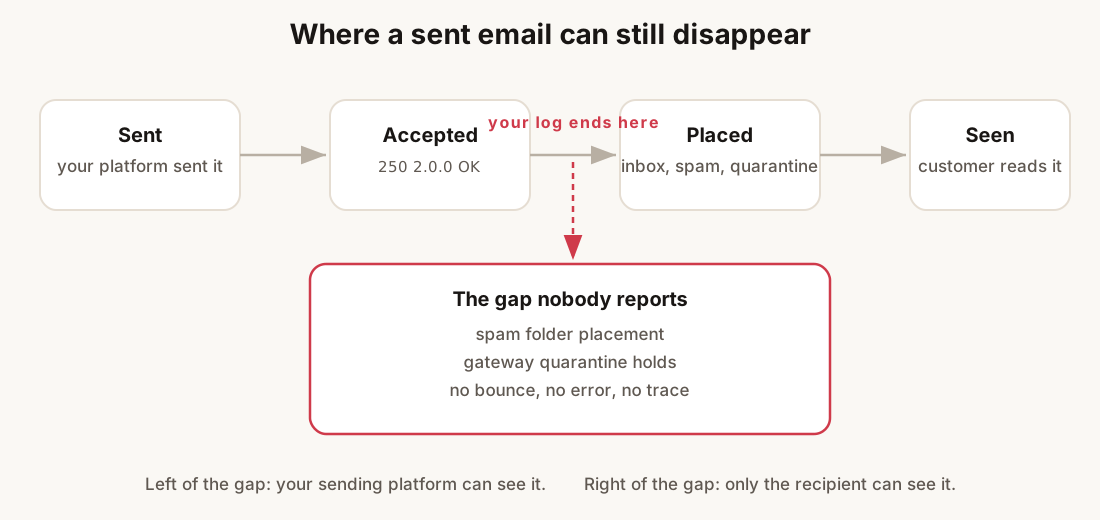
So a message nobody received sits in one of four states:
- In the spam folder. The receiver’s filter scored it as junk. It waits there until the customer looks.
- Held in a company gateway quarantine. Big employers run mail systems that hold messages they do not trust. The employee never sees the hold, and no bounce comes back.
- Bounced, and the bounce went unread. The address is dead or was rejected. The failure is written in a log nobody opened.
- Never sent at all. The address was suppressed after an earlier failure, the campaign stopped partway through, or the address was mistyped at signup.
Do this: search your platform’s log for the customer’s exact address before you touch any DNS or settings. The status word next to it cuts four possible states down to one or two.
What “delivered” actually tells you
Sending platforms can only report their own side of the conversation. The moment the receiving server answers 250, the conversation is over. The platform writes delivered, whether the message is heading to an inbox, a junk folder, or a quarantine.
Placement is decided after acceptance, by filters weighing things your log never sees: whether your SPF, DKIM and DMARC records pass, what the sending domain’s reputation looks like, and whether this recipient has ever replied to you. Two messages with the same log line can land in opposite folders. A company gateway can swallow a message whole and tell no one, because a receiver that accepts mail does not have to report what it did with it.
That is the trap in the green checkmark. It is not lying. It is answering a different question than the one you are asking.
Do this: treat delivered as “the door opened”. Then go find out which room the message walked into. The next section shows how.
One question that settles half of these
Before you diagnose anything, ask the customer to check their spam folder for your message from Tuesday morning.
If they find it, you have your answer: spam placement, cause one below, and you know exactly which message to inspect. If they find nothing anywhere, even with help from their IT, the message likely never finished delivery. That points at causes two and three. This costs nothing and takes a minute. It beats guessing at DNS records that may be perfectly fine.
Do this: send that question now, and read the rest of this while you wait for the reply.
The three causes, ranked
Cause one: it is in the spam folder
By far the most common answer. The filter scored your message as junk. The reason is usually your records or your reputation, not the words in the message. An invoice with a payment link, sent to a customer who has never replied to your domain, is exactly what filters are built to be suspicious of.
The tell: the customer finds it in junk, or a second customer reports the same thing. Run the email health check on your sending domain and read the record verdicts before you change a word of the message. If the records are clean and this keeps happening across customers, read the spam diagnostic hub for the reputation and complaint signals.
What to do: fix what the health check shows. If it still happens across customers after that, treat it as a reputation problem, not a template problem.
Cause two: the address is dead or wrong
Second most common, and the easiest to confirm, because your own log already knows. Search it again and look at the failure line:
Aug 26 09:14 jane@ardentsuply.com bounced 550 5.1.1 User unknownOne letter missing from the domain. The mailbox closed last year. The customer mistyped their address in your checkout form, the version of this that ecommerce brands see most. All three end in the same 550 5.1.1 shape. The message never reached a human, and nothing about your domain is at fault.
The tell: the log line for that address says bounced with a permanent code. Or the address is missing from the send list entirely, because your platform stopped sending to it after an earlier failure. Permanent codes each carry their own meaning. The one that means “the receiver does not want your mail” rather than “this address is dead” is unpacked in 550 5.7.1 message rejected.
What to do: get the correct address from the customer and remove the dead one. Then check where the bad address entered your system. A pile of these on one list is a collection problem, and sending to dead addresses is one of the fastest ways to hurt a healthy domain. A rejected address stays rejected, so do not keep retrying it.
Cause three: a company gateway quarantined it
The silent one. Large employers run mail gateways that hold messages they find suspicious. The message sits in a quarantine the employee has never opened and cannot find without IT. No bounce comes back, because the gateway accepted the message. Your log says delivered, and means it.
This happens most with invoices and account notices going to big companies. That is also the worst timing, because money is waiting on the message. And for every customer who calls you, others may be missing the same mail without saying a word.
The tell: the customer finds nothing in their own spam folder, and their IT can locate the message in a quarantine on their side. That last part is the confirmation. Nothing on your side can see it.
What to do: ask your contact to request a release and an allowlist entry for your domain with their IT. On your side, make sure the mail is fully authenticated. A clean SPF, DKIM and DMARC pass is the best evidence a gateway gets that your message is what it claims to be. Past that, another company’s filter is theirs to tune.
Soft bounce vs hard bounce: which one stopped this email?
Your log answers this before the code does. A hard bounce is permanent: the 550 family, like the 550 5.1.1 User unknown line above. The address is dead or rejected, and the fix is removal, not retrying. A soft bounce is temporary: the 4xx family, such as 421 4.7.0. The receiver took no message this time but did not close the door. Mailbox full, server busy, a rate limit. Most platforms retry soft bounces on their own.
Do this: look at the first digit of the code in your log. A 5 means remove the address or investigate the rejection. A 4 means wait and watch, because a rising pile of 4xx replies is an early warning worth reading before it turns into 5s.
How to check if your email domain is blacklisted
Spam placement has a harsher cousin: a blocklist listing. Blocklists are the lists that receivers and filters consult before accepting mail. A listed domain can watch mail vanish at the door, sometimes with a bounce that names the list, sometimes with no visible trace at all, which puts you right back in the gap this article started with.
The blocklist checker answers the question in seconds, for the lists that actually affect delivery, and checking costs nothing. If your domain comes back listed, the removal procedure is its own job, and the free walkthrough lives in the blocklist delisting guide.
Do this: run the check on your sending domain before you blame the message. A clean result removes a whole branch of the diagnosis in under a minute.
Verify before the next send
Whatever the cause was, close it by checking the sending domain from outside your platform. The email health check reads your SPF, DKIM and DMARC records the way a receiver does and shows the verdicts in one view.
Then confirm with reality. After the fix, send the next real message to that customer and ask them to confirm it arrived. One confirmed delivery is worth more than any dashboard.
What the log can never tell you
Every check above answers for one message on one day. The gap in the middle of the pipeline, between accepted and placed, stays dark no matter how often you re-run the checks by hand. A DNS record can break on a Tuesday and junk a month of invoices before anyone calls. A blocklist listing can arrive and clear inside the same week, taking that week’s sending with it, and a check you run on Sundays will never see it. One campaign to a stale segment can draw enough complaints to move every message after it, for every customer.
That gap is what LitInboxes watches. It re-checks your records, blocklist status and reputation signals every six hours. It keeps the dated history that turns “customers stopped confirming” into “the DKIM record broke on the 14th”. And it sends an alert when something moves, over email on every plan, and over Slack, Discord or webhook on Pro. There is a live demo if you want to see the view before anything else goes missing.
The checklist
- Search your platform’s log for the customer’s exact address. Read the status word.
- Ask the customer to check their spam folder for that specific message.
- If it bounced, correct the address and check where the bad one came from.
- If nothing exists on their side, ask their IT to search the gateway quarantine.
- Run the email health check on your sending domain and fix every record it flags.
- Run the blocklist checker if placement problems predate this one message.
- Have the gateway allowlist your domain if quarantine was the cause.
- Put the domain on a watch cycle, weekly by hand or with continuous monitoring, so the next silent failure announces itself.
Find an email a customer never received
- Search your platform log for the exact addressOpen the campaign or message log and search for the customer's full address. Note the status word next to it: delivered, bounced, suppressed, or absent altogether. Delivered means the receiving server accepted the message, not that it arrived.
- Ask the customer to check their spam folderOne question settles placement. If they find the message there, the cause is spam placement. If they find nothing anywhere, suspect a company gateway quarantine or an address that never worked.
- Match the state to its fixSpam placement: run the email health check and fix what it shows. Dead address: correct or remove it, and check how it was collected. Gateway quarantine: ask your contact to have their IT release the message and allowlist your domain.
- Verify the sending domainRun the email health check on the domain in your From address and, if placement is suspect, the blocklist checker. Both read your domain the way a receiving server does, which your platform's own dashboard does not.
- Confirm with the next messageSend the next real message to that customer after the fix and ask them to confirm it arrived. One confirmed delivery closes the incident.
Frequently asked questions
My sending platform says delivered. Does that mean it arrived?
No. Delivered records that the receiving server accepted the message over SMTP. Which folder it landed in, or whether a company gateway held it, happens after that word and is not reported back to you. Ask the recipient to check their spam folder, or their IT to check a quarantine.
Can an email disappear with no bounce at all?
Yes. A receiver that accepts a message and then files it as spam or holds it in quarantine is not required to tell you anything. Bounces come from rejection at the door, not from filtering after acceptance. That asymmetry is why a silent inbox proves nothing either way.
The customer found my email in their spam folder. What now?
Have them mark it as not spam, which helps future mail from you to them specifically, then fix the cause: run a health check on your sending domain and read what SPF, DKIM and DMARC show. Placement problems are usually authentication or reputation, not the content of one message.
How do I stop this happening to the next customer?
Watch the sending domain instead of the single message. DNS records drift when vendors and migrations touch them, blocklist listings can come and go between weekly checks, and the first visible symptom is usually a person saying they got nothing. Continuous checks with dated history turn that into an alert instead of a surprise.